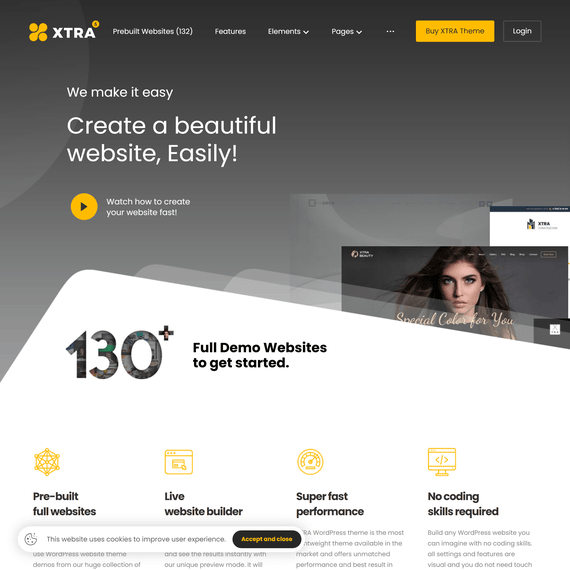
Description
The XTRA Aesthetic
Picture a homepage that opens with a full-width slider, a logo sitting exactly where you want it, a sticky header in a different color from the static one, and a footer built row by row to match the brand. You changed every one of those details while watching the page respond in front of you. That is the experience XTRA was designed around. It is a multi-purpose theme with a strong visual personality, and its live editing means the site you see while working is the site visitors will see.
The XTRA WordPress theme was created with input from working designers, and it shows in the demos. The layouts lean toward polished, confident presentation: generous imagery, deliberate typography, clean section rhythm. The tags attached to it hint at the territory it covers: agency, business, corporate, construction, factory, market. A manufacturer can show off its production floor. A small studio can put its portfolio front and center. A consultancy can look settled and serious without resorting to a template everyone recognizes.
Two page builders sit at the center of the theme, Elementor and WPBakery Page Builder. You pick the one you already know. Both support live front-end drag and drop, and the theme’s styling is written specifically for each, so you are not forcing one builder into a design made for the other. WPBakery users also get the classic back-end editor if they prefer working that way.
Right-to-left languages are handled too. Arabic and Hebrew appear among the theme’s tags, and RTL support is part of the package, which matters when a layout has to mirror itself properly rather than just flip the text.
Key Design Sections & Elements
The quickest way to understand XTRA is to look at what comes pre-built. More than 220 ready-made pages ship with the theme, organized into complete demo websites. The one-click demo importer brings a full site into your install, including Revolution Slider content, and the result is meant to match the preview you clicked on. Starting from a finished layout and replacing the words and photos is a lot faster than assembling a design from blank sections.
Page builder libraries
- WPBakery: over 100 page builder elements and more than 200 page templates, styled specifically for the theme.
- Elementor: over 50 widgets and more than 1200 section templates, plus advanced column settings and effects.
Those section templates are where most of the visual variety comes from. Instead of designing a pricing block or a team grid from scratch, you drop in a ready one and adjust it. If you work with Elementor Pro, the theme stays out of the way and lets those tools do their job.
Portfolio, gallery and blog layouts
Content-heavy sites get a lot of room to experiment. The portfolio, gallery and blog elements offer more than 28 layouts. Choose grids from one to eight columns, masonry in two to four columns, justified rows that fit a target height, metro-style arrangements, or a carousel. Posts can load through a load-more button, and visitors can filter by category or tag. You can run several portfolio pages, each pulling from its own categories, and single portfolio entries handle images, slideshows and video.
Headers, footers and menus
The header and footer builder works in real time. Add any element, style each row without limits, and use a logo of any size without the layout breaking. You can create multiple headers and assign separate ones for sticky and mobile states. Dropdown menus go as deep as six levels, which suits large catalog or corporate sites with a lot of pages to organize.
Customization Without Code
Theme options in XTRA update live, so changes are visible before you publish anything. That removes the usual cycle of saving, refreshing and squinting at a second tab.
Typography gets the most attention. The library includes more than 1825 Google Fonts, with subset and weight support and a live font preview inside the options panel. You can assign separate colors, sizes, families, margins, letter spacing and line heights to body text, each heading from H1 to H6, the footer and the sidebar. A site with a serif headline and a quiet sans-serif body takes a few minutes to set up.
Backgrounds are just as flexible. Boxed or wide layouts can have their own backgrounds globally or per page or post. You can place images in the header, footer, main content area and behind widgets. Page title bars support parallax, and each column from one to twelve can carry its own background image. Social icons in the header can be resized, reshaped and recolored with brand or custom colors.
- Logo placement on the left, right or center
- Color scheme, layout and sidebar controls
- Page title bar and breadcrumb styling, switchable globally or per page
- Loading screen for the whole site
- Back-to-top button and copyright bar toggles
- Custom post types and per-widget styling
Mobile gets its own attention. You can build a distinct mobile and tablet header, choose a fixed mobile menu, and hide specific parts on phones, tablets, or both. Because the theme is responsive and retina-ready, images stay sharp on high-density screens.
The theme is GPL-licensed, which means you are free to modify the code, build a child theme on top of it, and adapt it for the sites you run. Pair that with the visual options and you can go as far as you like in either direction.
Build Your Vision
Different projects use XTRA in different ways. A construction firm might import a corporate demo, swap in project photography, and use the portfolio layouts to present finished buildings by category. A factory or industrial supplier can lean on the section templates for capability pages, then set up a clean footer with contact details and a copyright bar.
An agency or freelancer has a different priority: showing work with style. Masonry and metro grids, video on single portfolio pages and parallax title bars give that portfolio room to breathe. Multilingual projects can use WPML, and forms can be handled with Contact Form, Gravity Forms or WPForms, all listed as compatible. Event-driven organizations can combine it with Events Calendar or Events Calendar Pro.
For online selling, WooCommerce support is built in. Shop pages can run in two, three or four columns, in full width or with a sidebar, and single product pages offer the same choice. Products can be displayed by category, ID or SKU, and WooCommerce shortcodes work with the theme. Easy Digital Downloads is also on the compatibility list for sites selling digital files.
Performance was part of the build. The theme uses lazy-loaded images, GPU-accelerated animations, low server requests and optimized output, and it is designed to stay SEO-friendly with a standard HTML structure and a sensible heading hierarchy. It is GDPR-ready as well.
Frequently Asked Questions
Can I use Elementor and WPBakery on the same site?
XTRA supports both builders, and its styling is written for each of them. Most people choose one per site to keep things tidy, because mixing them can leave you with two sets of content to maintain. If you are migrating from one builder to the other, you can still keep the theme.
Will the imported demo look like the preview?
The one-click importer is built to reproduce the demo as shown, including Revolution Slider content. Your own photos and text will naturally change the feel of a page. A step-by-step installation video tutorial is included to walk through the import.
Can I show different headers on desktop, sticky and mobile?
Yes. The header builder lets you create multiple headers and assign separate designs for the sticky state and for mobile. You can also hide selected elements on tablets or phones, so a wide desktop navigation does not have to be crammed onto a small screen.
Does the theme work for right-to-left languages?
RTL support is included, and Arabic and Hebrew are among the languages the theme is tagged for. Combined with WPML compatibility, that makes it workable for sites that serve readers in several languages, including ones that read right to left.