
Description
The ColorMag Pro (Premium) Aesthetic
Before you write a single post, ColorMag Pro (Premium) lets you decide how the whole site should look. Layouts, colors, and typography are all adjustable, and the header, footer, individual pages, and single posts each get their own attention. You are not stuck with one fixed template and a logo slot. You pick a direction and shape it.
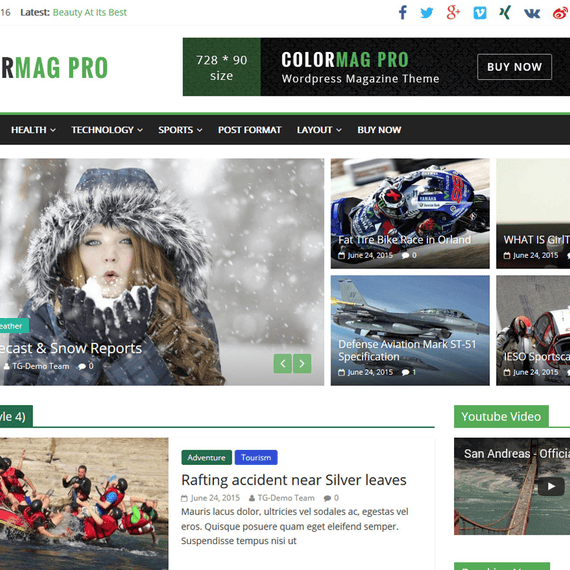
The ColorMag Pro (Premium) WordPress theme is built for news portals, online magazines, personal blogs, and publishing sites. The look leans editorial: dense grids of headlines, featured stories at the top, category blocks that let readers scan quickly. It’s a style that suits a site with many posts competing for attention, where a clear visual hierarchy does more work than decoration.
The theme comes with 30+ one-click starter demos. They cover news, health, sports, entertainment, and fashion. Import one and you have a working homepage with the structure already in place, ready for your own logo, colors, and content. Many publishers use a demo as a rough draft of the design and then change it until it no longer resembles the original.
Key Design Sections & Elements
Starter Demos by Niche
A sports site and a fashion magazine have different needs. The first wants scores, headlines, and tight lists. The second wants large images and room for white space. The demos reflect that split rather than offering one layout in five color schemes.
- News demos for breaking-story sites with a lead story and stacked headline lists
- Health and lifestyle demos with calmer palettes and image-forward cards
- Sports demos built around fast scanning of many short items
- Entertainment and fashion demos that give photography more space
Magazine Blocks Integration
ColorMag Pro (Premium) integrates deeply with the Magazine Blocks plugin, which adds 21+ custom Gutenberg blocks for post layouts. These are the pieces that make a homepage feel like a magazine front page: post grids, lists, and sliders that pull from your categories and tags. You place them in the block editor and see the arrangement as you build it.
Ad-Ready Layout
Built-in ad widget areas mean you don’t need to hack in banner space later. If your site earns through display advertising, the layout already leaves room for it, so the design doesn’t have to be reworked once the first ad network is connected.
Speed and Clean Markup
The theme pairs its layouts with lean code and optimized CSS and JS, and it is tuned for Core Web Vitals. A heavy homepage full of images and post modules needs that discipline. Fast pages keep readers on the site, and the SEO-friendly markup gives search engines a clean structure to read.
Customization Without Code
Every visual setting sits in the interface, not in a stylesheet you have to edit. You can change the header arrangement, recolor the site, swap fonts, and rearrange the footer without opening a code file. When a client wants the red accent changed to dark green, it’s a short job.
Page builders are covered too. ColorMag Pro (Premium) works with the default Block Editor, and with Elementor and other major page builders. If you prefer Gutenberg for posts and Elementor for landing pages, you can use both on the same site without fighting the theme.
The theme is GPL-licensed, which matters for anyone who wants real control. You can modify it, extend it, and use it across your own projects within the license terms. A developer building a custom child theme for a client has the freedom to do so, and a solo publisher can tweak things as the site grows.
More Built-In Options
- Full Gutenberg support for posts and pages
- WooCommerce compatibility for sites that add a shop beside their editorial content
- RTL support for right-to-left languages
- Translation readiness in 35+ languages
The multilingual side is worth noting for regional publishers. A news site serving an Arabic or Hebrew audience needs a layout that mirrors properly, not one that merely translates the menu labels.
Build Your Vision
Consider a few real starting points. A local news team picks a news demo, replaces the logo, sets the brand color, and fills the lead slot with the day’s top story. A health blogger starts from a lifestyle demo and trims the homepage to three category blocks. A fashion editor uses image-heavy post layouts from Magazine Blocks and keeps typography light and spare.
In each case the workflow is the same: import, adjust, publish. The structure is there from the start, so your time goes into the content and the details that make the site yours. As the publication grows, you can add more blocks, rework the homepage, or add ad placements without rebuilding anything.
Compatibility and Requirements
- Theme version: 5.2.5
- Minimum PHP version: 7.4
Confirm that your hosting environment meets the PHP requirement before installing, since the theme will not run correctly on older versions.
Frequently Asked Questions
How many starter demos come with ColorMag Pro (Premium)?
The theme includes 30+ one-click starter demos. They are organized around news, health, sports, entertainment, and fashion niches. Each one imports a complete homepage structure that you can then recolor and rearrange.
Do the Magazine Blocks work with the theme out of the box?
ColorMag integrates deeply with the Magazine Blocks plugin, which provides 21+ custom Gutenberg blocks for post layouts. They are the main tool for building magazine-style homepages in the block editor. You’ll need the plugin active to use those blocks.
Can I use Elementor instead of Gutenberg?
Yes. The theme works with the default Block Editor, Elementor, and other major page builders. You can pick whichever you prefer or mix them across different pages.
Is the theme suitable for a site that sells products as well as publishes articles?
The theme is compatible with WooCommerce, so a shop can sit alongside your editorial content. This suits a magazine that sells merchandise or a blogger with a small product line. The ad widget areas and post layouts remain available on the content side.


