
Description
Overview/Introduction
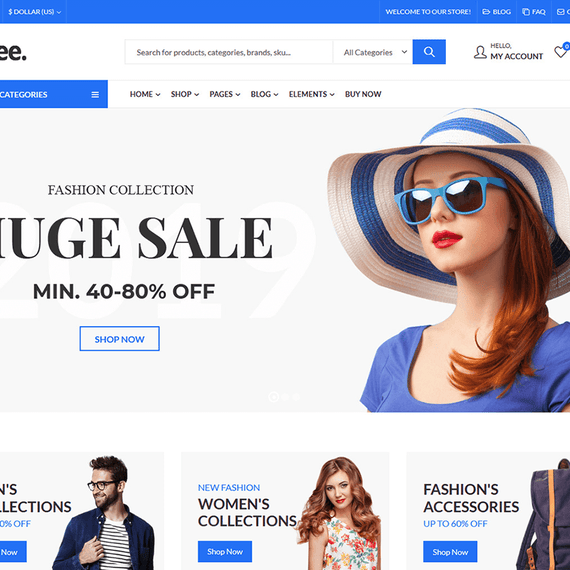
Kapee is a dynamic and visually stunning WordPress theme designed to elevate your online presence. With its fast-loading, clean aesthetic and highly customizable features, Kapee is an ideal choice for a diverse range of online shops, from fashion boutiques to electronics retailers. The theme’s responsive design guarantees that your website will look exceptional on any device, be it a smartphone, tablet, or desktop. In addition, the GPL-licensed nature of Kapee gives you the freedom to modify and distribute the theme according to your needs, making it a flexible option for both novice and experienced web developers.
The Kapee WordPress theme is not just about aesthetics; it’s also packed with powerful functionalities that make it easy to create and manage your online store. The theme seamlessly integrates with popular plugins like WooCommerce, WPBakery Page Builder, and Revolution Slider, allowing you to enhance your site’s capabilities without the need for extensive coding skills. Whether you’re launching a brand-new e-commerce site or revamping an existing one, Kapee provides all the tools you need for success, ensuring a professional look and feel that leaves a lasting impression on your visitors.
Key Features
Kapee is a feature-rich theme designed to empower users with a plethora of customization options and functionality. Here is a comprehensive breakdown of what makes Kapee stand out:
- Clean and Modern Design: The theme’s sleek layout and modern design elements provide a polished look that attracts visitors and keeps them engaged.
- 12+ Unique Homepages: Choose from a variety of pre-built homepage layouts to find the perfect starting point for your website.
- WordPress and WooCommerce Ready: Fully compatible with WordPress and WooCommerce, Kapee makes it simple to start selling your products online.
- Smart Sticky Header & Sidebar: Improve navigation and accessibility for your users with sticky header and sidebar features that remain visible as visitors scroll.
- Drag & Drop WPBakery Page Builder: Create stunning page layouts intuitively without needing to write a single line of code. Customize your pages effortlessly with the drag-and-drop feature.
- Advanced Mega Menu: Design complex menus with ease, allowing your customers to find exactly what they’re looking for quickly.
- Instant Ajax Search: Users can search for products easily with a fast, live search feature that updates results in real-time.
- Multi-Vendor Support: Kapee supports various multi-vendor plugins like Dokan, WC Vendors, and WCFM Marketplace, perfect for those looking to create a marketplace.
- Responsive & Retina Ready: Kapee ensures that your website will look sharp and beautiful on all devices, enhancing the user experience.
- One-Click Demo Importer: Quickly set up your website with demo content, including layouts, posts, and theme options, enabling you to get started without hassle.
- SEO Ready: Fully optimized for search engines, Kapee supports popular SEO plugins, ensuring your shop ranks well on Google and other search engines.
- Advanced Blog Options: Share your insights and updates easily with sophisticated blog layouts and styles that take full advantage of multimedia content.
Use Cases
The versatility of Kapee makes it suitable for a wide range of users, whether you’re a small business owner, a seasoned entrepreneur, or even a freelancer. Here are some specific audience scenarios:
1. E-commerce Store Owners
If you are launching an online shop, Kapee provides the ideal platform. For fashion retailers, Kapee’s stunning design can showcase your clothing, accessories, and collections with style. Electronics sellers can take advantage of product comparison features, helping customers make informed choices between various gadgets. With built-in WooCommerce support, you can easily manage products, payments, and customer interactions.
2. Multi-Vendor Marketplace Creators
If you are interested in creating a multi-vendor marketplace, Kapee has got your back. With compatibility for Dokan and other multi-vendor plugins, you can set up a platform where different sellers can manage their products, streamline customer transactions, and collaborate with ease. Kapee’s features like advanced review styles and product video capabilities will enhance trust and engagement between your vendors and customers.
3. Bloggers and Content Creators
For bloggers and content creators looking to share their insights, Kapee offers a rich blogging experience with fully customizable layouts and advanced blog options. The theme allows you to present your content in various formats, including video, audio, and galleries, making your site engaging and visually captivating. Whether you are writing about technology, fashion, lifestyle, or travel, Kapee gives you the tools to create a stunning storytelling platform.
Compatibility & Requirements
Kapee is designed for optimal performance within the WordPress environment. Here are the essential compatibility and requirements:
- WordPress Compatibility: Kapee is compatible with the latest WordPress version, ensuring that you have access to the most up-to-date features and security enhancements.
- WooCommerce Compatibility: Fully integrated with WooCommerce 10.5.X, Kapee is built to support your e-commerce functionalities seamlessly.
- PHP Version: Make sure your server runs on PHP 7.2 or higher for optimal performance.
- Page Builder Support: Kapee works perfectly with WPBakery Page Builder and Elementor, allowing for easy drag-and-drop customization.
- RTL Language Support: Kapee supports right-to-left languages, making it suitable for a diverse audience across the globe.
Frequently Asked Questions
Is Kapee easy to customize for beginners?
Absolutely! Kapee has been designed with user-friendliness in mind. Its drag-and-drop WPBakery Page Builder allows even those without coding knowledge to create beautiful layouts effortlessly. Additionally, the one-click demo importer makes it simple to set up your site quickly.
Can I run a multi-vendor site with Kapee?
Yes! Kapee supports various multi-vendor plugins like Dokan, WC Vendors, and WCFM Marketplace, making it an excellent choice for anyone looking to create a multi-vendor e-commerce platform.
Does Kapee come with demo content?
Kapee features a one-click demo importer that allows you to replicate the demo site, including all posts, pages, and theme options. This helps you get your website up and running in no time while you customize it further to suit your brand’s needs.
Is Kapee SEO-friendly?
Yes, Kapee is designed with SEO best practices in mind, ensuring that your site is optimized for search engines. It is compatible with popular SEO plugins like Yoast and All in One SEO, helping you improve your site’s visibility.