Description
The First Thing You Notice Is the Design System
Open any of the 33+ demos bundled with Exponent and the same thing happens: the spacing feels right, the type feels balanced, and nothing looks like it was bolted on as an afterthought. That’s because Exponent WordPress theme isn’t a pile of unrelated templates — it’s built on a single design system where typography scales, color palettes, and layout blocks all follow the same underlying logic. Gradients, shape dividers, soft shadows, and illustration-driven sections show up across the demos not as decoration for decoration’s sake, but as a consistent visual language you can apply to your own pages. The result is a theme that looks like it was designed by one team with one point of view, because it was — the same team behind Oshine, refining what they learned across thousands of live installs.
What sets Exponent apart from a typical multipurpose theme is the pairing of that design system with a fully visual builder, so nothing you see in a demo is locked behind custom code. Every section, every hover effect, every carousel is a module you can open, inspect, and rebuild in your own layout. Add to that 200+ page layouts and hundreds of pre-built layout blocks, and you have a starting library big enough that most projects begin with assembly rather than design-from-scratch.
Customization Possibilities
Exponent is built around Tatsu, a front-end visual builder that shows your changes live, without toggling between an editor screen and a preview tab. You drag a module onto the page, type directly into the live text editor, and watch the layout update in real time. With over 50 styling modules available, you’re not limited to text and image blocks — there are modules for pricing tables, testimonials, counters, galleries, forms, and more, each with its own set of design controls.
Typography gets its own deep layer of control. Exponent gives you access to hundreds of Google and Adobe fonts, plus granular settings for size, spacing, weight, and line height at the element level rather than a single sitewide setting. Color management works the same way: you can build out palettes, save swatches for reuse, and apply gradients to backgrounds, buttons, and section overlays. This matters in practice because a law firm site and a gym site shouldn’t share the same visual tone, and Exponent’s controls are specific enough to let you actually differentiate them rather than just swap out a logo.
The header and footer builder deserves its own mention. Instead of picking from a short list of fixed header styles, you construct your header the same way you build a page — module by module — and can create multiple headers or footers for different sections of the site. Combine that with global sections (edit once, update everywhere), templating for saving sections or full pages for reuse, and keyboard shortcuts for cutting, copying, and pasting modules across pages or even across separate websites, and the workflow starts to feel less like “customizing a theme” and more like operating a proper design tool. Because Exponent ships under a GPL license, you’re free to adapt, modify, and extend the theme’s code and templates for your own projects without licensing restrictions getting in the way of that flexibility.
Design Elements & Components
Beyond the builder itself, Exponent’s component library is where the day-to-day time savings show up. Blog styling alone comes in 8 distinct visual styles, and each one can be adjusted for aspect ratio, spacing, meta info placement, and background treatment — enough range to make a personal blog and a corporate news section look like they belong to different brands while running on the same theme install. Individual post templates support Video, Audio, Quote, Gallery, Link, and Standard post formats, and single post pages come with a bold title area, social sharing icons, author bio blocks, a comments section, and post navigation — the small details that make a blog feel finished rather than default.
For stores, Exponent layers its design system directly onto WooCommerce. Product grids, quick view popups, sliding cart panels, image zoom, variation swatches, and wishlists are all styled to match the rest of the site rather than looking like an unstyled plugin dropped into a themed page. Since the goal is conversions, product pages lean on clean layouts and restrained typography so the product photography stays the visual focus.
Portfolios and galleries get similar attention: multiple hover effects, floating sidebars, carousel options, and grid types give creative professionals a way to present work without reaching for a separate plugin. And because everything — blog, shop, and portfolio components alike — is built from the same modules used elsewhere in Tatsu, styling choices you make in one area carry over easily to another.
Layout Options
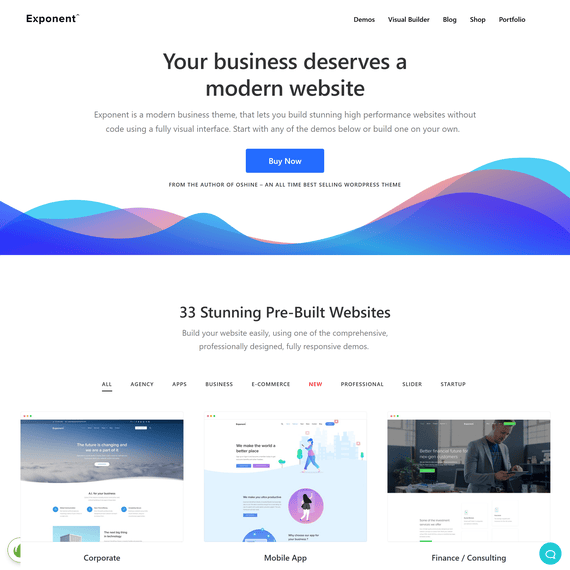
With 200+ page layouts and 33+ full demos spanning industries from construction to law firms to SaaS products, Exponent gives you enough variety that most projects can start from something close to the finished product. The two most recent additions, Handyman and Cleaning, joined the collection in the last update, reflecting ongoing expansion into local-service business use cases alongside the existing corporate, agency, and e-commerce demos.
The one-click demo importer pulls in a full demo — pages, images, and settings — in a single action, so there’s no manual rebuilding of sample content just to see how a layout works. You’re not locked into picking one demo either: import multiple demos and mix pages from each into a single site, which is useful when, say, you like the homepage from the SaaS demo but prefer the blog layout from the agency demo. Layout flexibility also extends to grids — spacing and aspect ratio controls let you build unlimited grid variations for portfolios, shops, or blog archives rather than choosing from a fixed set of column layouts.
Industry coverage is broad enough to be worth listing out directly. Demos are built around Corporate, Mobile App, Finance/Consulting, Startup, Construction, SEO Agency, Web App/SaaS, Law Firm/Attorney, Doctor/Dentist/Medical, Shop, Education/University, Agency/Freelancer, Hosting, Architecture, Product, Portfolio, Restaurant, Farm, Charity, Book, Event/Conference, Movers & Packers, IT Company, Life Coach, Gym/Fitness, and Lead Generation use cases, among others. A construction company can start from a demo already structured around service listings and project galleries, while a consultant or life coach can begin from a demo built for lead capture and personal branding — the underlying page-building tools stay the same either way, only the starting content changes.
Compatibility & Requirements
Exponent, currently at version 1.3.1.1, is built for WordPress 6.2.x. It’s compatible with Facebook, Easy Digital Downloads, Events Calendar, Gravity Forms, and WPML, giving you a path to multilingual sites and event or form-based functionality without leaving the theme’s supported plugin list. WPML compatibility specifically means Exponent is translatable for teams building sites that need to serve more than one language market.
Because it’s tagged and organized around industries like app, book, business, construction, consulting, corporate, event, finance, handyman, and landing, it’s worth checking that your target industry demo exists before starting, even though the visual builder means you’re never truly restricted to a single template’s layout.
Frequently Asked Questions
Can I combine sections from different Exponent demos on one page?
Yes. The one-click importer lets you bring in multiple demos and then pull individual pages or sections from each into a single site. This is common when a client likes the homepage of one demo but wants the service page layout from another — you’re not committed to one demo’s structure end to end.
Does Exponent work with WooCommerce out of the box, or do I need extra configuration?
Exponent is built to style WooCommerce directly, including product grids, quick view, sliding cart, zoom, variations, and wishlists. You’ll still need WooCommerce installed and configured with your products and payment settings, but the visual styling of shop pages is handled by the theme without additional custom CSS.
What happened in the most recent update to Exponent?
The last update, released October 15, 2025, added two new demos: Handyman and Cleaning. This brought the total demo count to 33+, extending Exponent’s coverage into local service-business use cases.
Is Tatsu, the builder used in Exponent, a separate purchase?
The version of Tatsu included with Exponent is the free builder, giving you drag-and-drop editing, the header and footer builder, and the full library of styling modules. Tatsu Pro, sold separately as an addon through Tatsu Builder, adds extra modules and pre-built demos, but it isn’t required to use the core features described for Exponent.
Can I build a multilingual site with Exponent?
Yes. Exponent is translatable and compatible with WPML, one of the plugins listed among its supported integrations. This allows you to set up a site serving multiple languages using the same demo content and layout structure as your primary-language pages.