
Description
What Can You Change in Hestia Pro Without Touching Code?
Almost everything you see on the front end of a Hestia Pro site can be adjusted from the WordPress Customizer, with a live preview beside the controls. Colors, header layouts, footer arrangements, blog styling, WooCommerce appearance and front page sections all sit in one place. You change a setting, you watch the page respond, and you move on. For anyone who has spent an afternoon bouncing between a theme options panel, a child theme and a stylesheet, that workflow feels refreshingly direct.
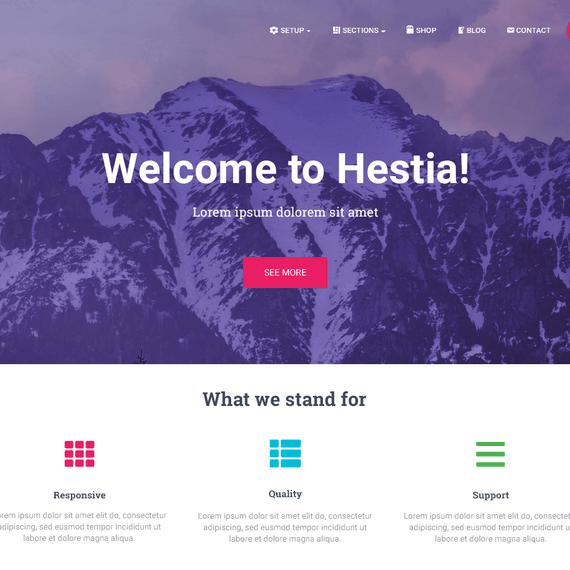
Hestia Pro is a Material Design WordPress theme built on the Material Kit look: soft shadows, layered cards, clean typography and generous white space. It suits a one-page business site, a portfolio, a small-shop storefront or a freelancer’s personal site. The Pro version adds the controls that matter when a project needs to look like its own brand rather than a demo.
Front Page Sections You Can Add and Rearrange
The Pro version adds front page sections that go beyond the basics: Shop, Pricing, Portfolio and a Hero Slider that can play a background video. A restaurant could open with a looping kitchen clip behind its tagline, then move down to a pricing block for tasting menus. A wedding planner might lead with a slider and follow with portfolio cards from past events.
Header, Footer, Blog and Shop Controls
Advanced options open up header and footer layouts, blog presentation, WooCommerce layout, color choices, design effects and branding. Those branding controls are what let a client’s site stop resembling every other site running the same theme.
Which Design Elements and Components Come With It?
The design language here is deliberate. Material Design gives Hestia Pro a card-based structure where content blocks feel lifted off the page, and the effect stays calm rather than busy. Text remains readable, buttons look clickable, and sections separate clearly as visitors scroll.
Several components do most of the visual work:
- Hero Slider with background video for a motion-led first impression on the front page.
- Portfolio cards that present recent projects in a grid visitors can scan quickly.
- Pricing section for laying out service tiers side by side.
- Shop section to put WooCommerce products on the front page instead of burying them in a menu.
- Widgetized footer for contact details, links, newsletter forms or a short about blurb.
- Blog and news page styled to match the rest of the site.
Retina-ready display keeps images and icons crisp on high-density screens, and the responsive layout adapts to phones and tablets without a separate mobile build. Speed also gets attention. The theme is built to stay light, which a customer quoted in the product’s feedback noted when pairing it with Elementor.
WooCommerce Designs
Online stores get dedicated styling. The Épineuse jewelry collection by Vlum is one example of Hestia presenting product pages in a refined, uncluttered way, so each piece gets room to be looked at before it is bought. Pro adds control over the WooCommerce layout and its colors, so a shop can match the rest of the brand instead of falling back to default store styling.
How Flexible Are the Layout Options?
Hestia Pro began life as a one-page theme, and it still does that well: a single scrolling front page with sections for services, team, portfolio, contact and more. But it is not locked into that shape. Blog pages, inner pages and shop pages all have their own layouts, and the Pro options let you tune each one.
Custom Layouts and Hooks
One of the more distinctive Pro features is the ability to insert custom sections into hook locations on various pages. You can show those sections conditionally, and you can even set expiration dates on them. Picture a seasonal banner on a shop page that disappears on its own after a sale ends, or a notice displayed only on selected pages. That kind of control usually calls for a custom plugin or a snippet.
Page Builder Freedom
Hestia works with Gutenberg and with the popular page builders: Elementor, Brizy, Beaver Builder, Visual Composer, SiteOrigin and Divi Builder. Build the front page in the block editor, design a landing page in Elementor, or mix approaches across the site. The theme stays out of the way and supplies the typography, color and structure underneath.
Multilingual Layouts
The theme is ready for multilingual sites and works with the major translation plugins, including WPML, so any section can be translated. A French agency and a German construction firm can both run Hestia with text in their own language across every block.
What Does Customization Look Like in Practice?
Real sites show the range better than a feature list. Optikbau Wetzlar, a construction and architecture business, uses a sleek layout to put its portfolio, core services and contact details in clear view. City Press, a French web design company, uses the portfolio cards on its front page so visitors can browse recent collaborations immediately. Numbered Days, a death doula practice with a personal blog, combines a clean layout with a newsletter section that keeps readers up to date. A fitness business in the customer feedback describes using the theme to build something fresh, functional and easy to navigate.
The same starting point produces very different results. An architecture firm leans on structure and imagery. A writer’s practice leans on typography and a newsletter signup. A jewelry shop leans on product photography. Hestia Pro supports each approach through Customizer settings, not through custom development.
Starter Sites as a Head Start
Pro includes access to all starter sites, including the premium ones. Import one, replace the text and images, then adjust colors and sections until it fits. It is a faster way to see how the theme’s components work together than building from a blank page.
Extending Hestia Pro Under the GPL
Because the theme is GPL-licensed, you are free to modify and extend it for your own projects. One user mentioned adding a small piece of code to change something specific, and found the theme light enough to accommodate it. Developers can build child themes or tweak templates, while everyone else can stay inside the Customizer.
License Tiers for Different Workloads
Licensing depends on how many sites you run. One tier covers a single site, another covers three, and an agency tier allows use on unlimited client sites. Freelancers and studios who build for others will probably find the agency option the natural fit.
Frequently Asked Questions
Can I put a video behind the front page hero?
Yes. The Pro front page sections include a Hero Slider that supports a background video. You set it up in the Customizer alongside the rest of the front page. It works well for restaurants, event planners and any business with strong footage to show.
Can I show a promotional section on a page and have it disappear later?
Yes. Custom Layouts and Hooks let you place your own sections in available hook locations on various pages. You can display them conditionally and set an expiration date. That makes timed announcements or seasonal content easier to manage without editing templates by hand.
Will Hestia Pro work for a site in more than one language?
It is built to be fully multilingual and works with the major translation plugins, WPML among them. You can translate any theme section, so headings, buttons and front page blocks all follow the language the visitor has chosen.


