Description
The AdForest Aesthetic
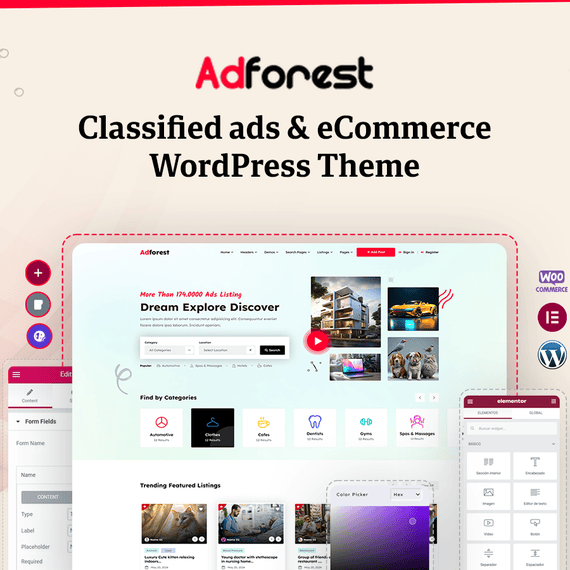
AdForest opens with something most classified ads themes never bother getting right: a visual language that feels equally at home on a car dealership site, a pet adoption board, or a full-blown multi-vendor marketplace. Built on Bootstrap 5, HTML5, CSS3, and jQuery 3.x, the theme renders clean grid structures, generous whitespace, and typography that doesn’t fight for attention with your listings. The design doesn’t scream “template” — it reads more like a custom build, with layout choices that put ad photos and category icons front and center instead of burying them under decorative clutter.
What sets the adforest WordPress theme apart visually is how it handles density. Classified sites live or die by how much information they can show without overwhelming a visitor, and AdForest solves this with multiple homepage layouts and custom header styles that let you decide how much to surface above the fold. A real estate portal might want large hero imagery and a prominent map search; a job board might prefer a compact list view with filters up top. AdForest ships with the layout variety to support both without requiring a rebuild.
Color, iconography, and spacing all stay consistent across device sizes too. The responsive design isn’t an afterthought bolted onto a desktop-first layout — grids reflow, navigation collapses into mobile-friendly menus, and touch targets stay usable on smaller screens. Combined with Font Awesome icon sets and clean typography, the overall look stays coherent whether someone lands on your homepage from a Google search or opens your companion mobile app.
Key Design Sections & Elements
Every classified or marketplace site needs a handful of pages to do the heavy lifting: the homepage, the listing archive, the single ad page, and the user dashboard. AdForest treats each of these as its own design problem rather than reusing one generic template everywhere.
- Homepage modules — category grids, featured ad carousels, search bars with radius and price filters, and banner ad zones that can be rearranged depending on what you’re promoting that week.
- Listing views — grid, list, and gallery display options give visitors control over how they browse, which matters a lot on inventory-heavy sites like auto dealerships.
- Single ad pages — built around an image gallery with drag-and-drop upload support, dynamic ad status labels (Sold, Expired, Active), a bidding system for auction-style listings, and a built-in messaging system so buyers and sellers don’t need to exchange personal contact details right away.
- Category-based search — structured up to four levels deep, which suits complex taxonomies like real estate (type, region, price bracket, amenities) far better than a flat category list.
- Seller profiles — public profile pages with a rating system that build trust between buyers and sellers over repeated transactions.
Google Maps integration with a location picker ties several of these sections together. Sellers place a pin when submitting an ad, buyers filter by radius when searching, and the map renders on both listing archives and single ad pages. It’s the kind of connective tissue that makes a classifieds site feel like a real platform instead of a glorified blog with a submission form.
The dashboard experience deserves its own mention. Users get profile pages, ad management tools, alert notifications for saved searches, and a clear view of ad expiry timelines — all without leaving the front end or touching wp-admin. That separation matters for a public-facing marketplace where you don’t want ordinary users anywhere near the WordPress backend.
Customization Without Code
AdForest is built with the Redux Framework, which means most of the visual and functional decisions — header style, color accents, homepage module order, ad package rules — live inside an options panel rather than in a template file. Because the theme is distributed under the GPL license, site owners are also free to open up the code directly and modify it, extend functions, or build child themes without licensing restrictions getting in the way. That combination gives you two paths: quick adjustments through the options panel for most changes, and full code-level access when a project needs something the panel doesn’t expose.
Elementor compatibility extends this further. Homepage sections, category-based ad widgets, and custom pages can be assembled visually, and recent updates added a grid layout option specifically for the Category Based Ads Elementor widget, along with pagination, “Show More,” and infinite scroll behavior for that same widget. There’s also an automatic “View All” button that links straight to the relevant category archive — a small detail, but one that saves you from manually wiring up navigation every time you add a category.
One-click demo import removes most of the setup friction. Instead of building pages from scratch, you import a demo close to your use case — real estate, auto listings, general classifieds — and adjust from there. Existing AdForest users moving to newer versions have a dedicated guide for importing the redesigned pages, so upgrading doesn’t mean starting the whole build over. WooCommerce integration and MultiVendorX support are similarly configuration-driven: you set commission structures, vendor permissions, and store layouts through plugin settings rather than editing PHP files.
Translation and localization are handled the same way. RTL support and WPML compatibility are built in, so running the theme in Arabic, Hebrew, or any right-to-left language doesn’t require custom CSS overrides. Bad word filtering for ad submissions, MailChimp integration for list building, and Contact Form 7 support all slot in through settings panels too, keeping the no-code promise consistent across the feature set.
Build Your Vision
AdForest was designed with monetization built into its structure, not added as an afterthought. If you’re running a multi-vendor marketplace, MultiVendorX integration lets you take commissions on vendor sales while giving sellers their own storefronts inside your WooCommerce-powered site. If you’d rather sell ad placement directly, sticky sidebar ads and dedicated advertisement spots across the homepage, search pages, and taxonomy pages give you inventory to sell or fill with AdSense.
The ad package system is where a lot of the revenue logic lives. You can build simple or paid packages, set category-based pricing, offer monthly plans, or charge per listing — whatever fits your market. A “bump-up” feature lets sellers pay to push their ad back to the top of search results or the homepage, which is a familiar monetization pattern for anyone who’s used a classifieds site before and gives your platform a built-in reason for repeat purchases.
Real-world scenarios where this plays out clearly:
- A local auto dealership site using grid and gallery listing views to showcase vehicle photos, with the bidding system enabled for auction inventory.
- A real estate portal relying on the four-level category search and Google Maps radius filtering to help buyers narrow down neighborhoods and property types.
- A regional buy-sell marketplace charging sellers for featured ad placement and paid listing packages, with manual ad approval to keep listing quality consistent.
- A multi-vendor storefront built on WooCommerce and MultiVendorX, where independent sellers manage their own inventory while the site owner collects commission.
Bulk import through the WP All Import plugin also matters for anyone migrating an existing dataset — a directory with thousands of existing listings doesn’t need to be rebuilt by hand. And because AdForest ships with synchronized mobile apps for Android and iOS, whatever structure you set up on the WordPress side extends to a native app experience without maintaining two separate codebases.
Compatibility & Requirements
- Version: 6.0.6
- Requires PHP: 8.0.30
- Compatible with WordPress 6.0.x through 7.0.x, including all point releases in between
- Compatible with Elementor
- Tags: ad listing, ad posting, ads, advertise, advertising, bidding, classified, classified ads, database, directory
Frequently Asked Questions
Does AdForest support auction-style listings, or is it only for fixed-price ads?
Both. The theme includes a bidding system specifically for ads that need an auction format, alongside standard fixed-price and paid listing packages. You can run them side by side, so a car dealership could sell some vehicles at a set price while auctioning others.
Can I migrate an existing classifieds database into AdForest?
Yes, AdForest supports bulk import through the WP All Import plugin, which is built specifically for moving large datasets into WordPress without manual entry. This is particularly useful for directory sites or marketplaces that already have thousands of listings sitting in a spreadsheet or another platform’s database.
How does the multi-vendor marketplace setup actually work?
AdForest integrates with MultiVendorX on top of WooCommerce, which lets independent sellers register, manage their own storefronts, and list products or services while you collect commission on sales. Vendors get their own dashboard and public profile with ratings, so the buyer-facing experience stays consistent even though the marketplace has multiple independent sellers behind it.
Will the mobile apps stay in sync with changes I make on the WordPress site?
Yes, the Android and iOS apps are built to work directly against your AdForest WordPress installation, so new listings, ad status changes, and user activity reflect across web and mobile without separate management. This means you can publish to the Google Play Store and Apple App Store without maintaining a second content pipeline.